From WordPress to Astro: Zero Maintenance, Maximum Control
· Mike Roberto · 7 min read
I've moved this site from WordPress to the Astro framework, hosted on Cloudflare. Here's why and how I did it.
If you're seeing this, then that means it worked.
After 20 years on WordPress, I've migrated this blog to Astro, using the AstroWind template and Cloudflare Pages.*
This blog is changing, and the tech stack needed to change with it. While you shouldn’t expect any further tech posts here, it’s worth sharing what I learned:
Why Leave WordPress?
Over time, I’ve learned that WordPress is a bloated pain for most projects:
Maintenance burden. Security updates, plugin conflicts, database overhead, spam management, VPS management, dealing with PHP, and features I’ll never need. For a blog that hasn't been my priority for years, WordPress felt like a ticking time bomb just waiting to get hacked.
Performance. Static HTML served from a global CDN beats PHP + MySQL every time. No server-side processing means millisecond load times. With content that doesn’t change much, there’s really no need for an entire database or other bloat.
Control. I want simplicity. Markdown files I can tweak, version control with Git, and zero database concerns. No more logging in. No more "the plugin broke something" troubleshooting sessions. No more “PHP is out of date” concerns.
WordPress simply isn’t necessary anymore, especially with the ability of LLMs to cook up custom code anytime, which is what I did with Astro.
Why Astro?
In one word? Speed. In a second word, simplicity.
Static-first philosophy. Astro generates pure HTML at build time, and I kept it free of client-side JavaScript unless explicitly needed. It’s fast by default with no framework bloat.
Markdown + MDX. Write in Google Docs, export to markdown, enhance with components when needed. Once the git repository is updated, the site rebuilds. It’s clean and simple for me.
Whoever put together the Astro framework really did a great job.
*Note: Completely random timing, but the day before this was posted, Astro announced that they were acquired by CloudFlare.
Why the AstroWind Template?
After playing with Astro a bit, I realized I wanted to use it, but there’s no “theme” system to plop into it. You’re actually better off starting with a template that’s closest to what you want, and then modifying it from there. I looked at a few, and found AstroWind.
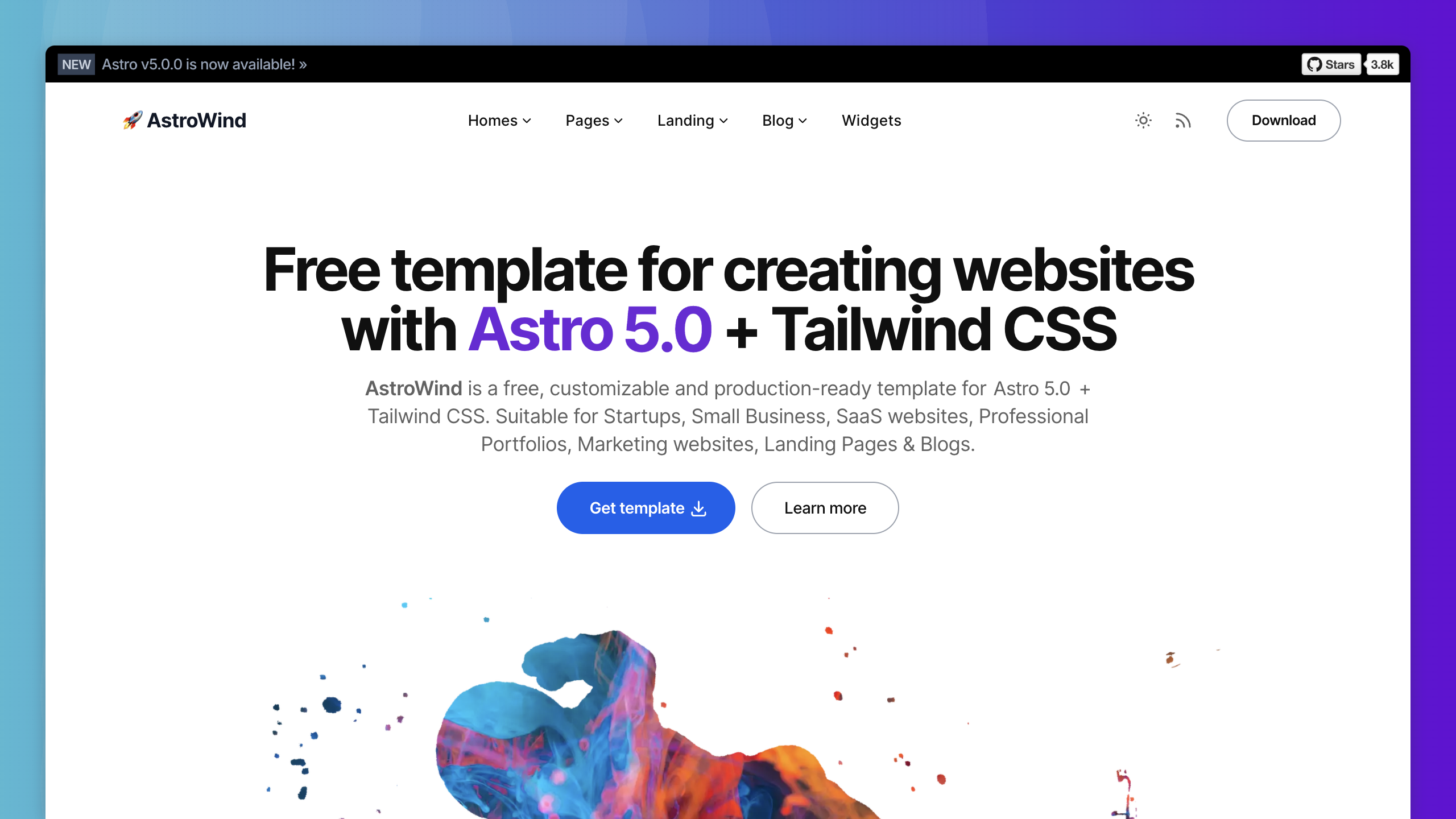
This is a pre-built template with Tailwind CSS integration, responsive layouts, dark mode, and all the blog essentials: tags, categories, and RSS.
I changed it from there to my liking. Note that this could turn into a drawback, since what I have has now deviated enough that if AstroWind were to get a major update, it wouldn’t be simple to patch it in. But as a static site with almost no security concerns, I guess I don’t care.
Why Cloudflare Pages?
Fast and free:
Zero maintenance hosting. Git push → automatic deploy. No VPS to patch. It just works, and it’s free for small guys like me.
Global CDN. Edge caching means fast load times everywhere. Content served from wherever the reader is, not from a single data center.
The WordPress Migration Workflow
So here’s the process:
Content extraction: WordPress XML export → Python script (written by Claude) to convert 61 posts to markdown with preserved frontmatter (title, date, categories, tags, excerpt). A bit of back-and-forth here, and a few cleanup scripts needed to be made after the fact. I kind of winged it here, and probably should have spec’d it out better from the start.
URL preservation: Organized posts by year in subdirectories (
src/data/post/2019/slug.md) so Astro's routing automatically creates/2019/slugURLs matching WordPress exactly. No broken links and existing URLs preserved.Comment archival: Extracted comments from XML, converted to static HTML, appended to relevant posts. For new comments, I switched to Giscus, which is powered by Github Discussions in a separate repository.
Image handling: Unlike my blog post URLs, my image URLs have changed. I moved Wordpress caption shortcodes to
<figure>tags with alignment classes styled inbase.css. Astro's built-in image processing handles responsive images at build time.Redirect migration: Exported WordPress Redirection plugin JSON, converted rules to Cloudflare format in
public/_redirects.
Finally, I manually created the About Me and Services pages, whose templates I borrowed from AstroWind.
How I Use Claude and LLMs
I sadly don’t have time to learn too much about a new system, but thankfully, I don’t need to these days anyway. That’s because of LLMs.

Right now, techies are raving over Claude Code, but I didn’t go that route because I wanted to learn a little bit about what’s going on.
So instead, I created a Claude project, loaded it with documentation, and asked Claude Sonnet how to make changes and customizations on my local dev box. When things would get rough, I’d have it create a big prompt for Claude Opus.
Getting Documentation Into an LLM Project
The trick is getting the LLM project everything it would need to know to best answer my questions without constantly searching the web. Astro and Tailwinds both have great documentation, but as far as I know, there’s no way to get their documentation as a single MD file. So I created my own.
I prompted Opus to create a script that would create one large MD file from all of the Astro and Tailwinds documentation repositories. You can see, use, and modify these scripts here:
Running these provides a big ol’ MD file, which you then upload to the Claude project. They just fit comfortably (currently 85% of project capacity used), and now I have a project that’s able to answer basically anything I need. I also linked my GitHub repo to the project.
As a result, every Claude session has complete context. No more "let me search the docs" back-and-forth. No more "here's a link to the documentation." Claude knows the entire framework and can find the files, but then would tell me what to change… so I’d have to learn at least some of it.
I don’t know how others are doing stuff like this, maybe these are caveman-AI practices, but for me, it’s the perfect mix of “having help” while still “forcing me to learn and do some stuff”.
One final note: If I needed a second opinion, or had a question I knew would require a web search, I used Grok, which seems to have the best web search capabilities.
Local Dev → GitHub → Deployment
Once I was satisfied with my local site, I deployed to CloudFlare Pages (again, with some help from Claude), and flipped DNS off of my old VPS. It worked instantly.
Now, Cloudflare Pages monitors the main branch. A git push triggers automatic build and deployment. No FTP, no SSH, no “wp-admin”.
The Result
So now we have a fast static HTML site with no database, no PHP, and [hopefully] no security patches or plugin conflicts. And definitely less spam. Just markdown files, git, and a global CDN.
And when I want to write? Open vim or Google Docs, generate markdown, test locally if I care to, git push, and watch it rebuild. Pretty cool.
So Why Go Through All This?
So why do this for a site I barely update? Well, because I'm about to start updating it… a lot. Only it won’t be with tech content.
I needed a faster system with far less maintenance overhead, and this seems to be the one. So much so that I’ll be using it for our new Bevlab segment, and more to be announced soon. The tech is basically invisible, so I can focus on content creation.
This Is Probably The Last Web Tech Post
If you found this looking for web development, Astro tutorials, or stack discussions -- thanks for reading! But don’t expect much more of it, as that’s not what we’ll be doing here.
But if you're curious about vitamin A toxicity, iron overload, metabolic health experimentation, growing white carrots, and the occasional culture rants? Stick around. Because that's where I’m headed.
I've spent the last few years learning that most of what we think we know about nutrition and metabolism is incomplete at best, wrong at worst. I've been documenting my own health experiments, reading studies nobody talks about, and connecting dots that don't get connected in mainstream health discourse.
This site will be the home for that work.
The tech served its purpose: zero maintenance, full control, ready to publish. Now let's use it.
Welcome to the new chapter.